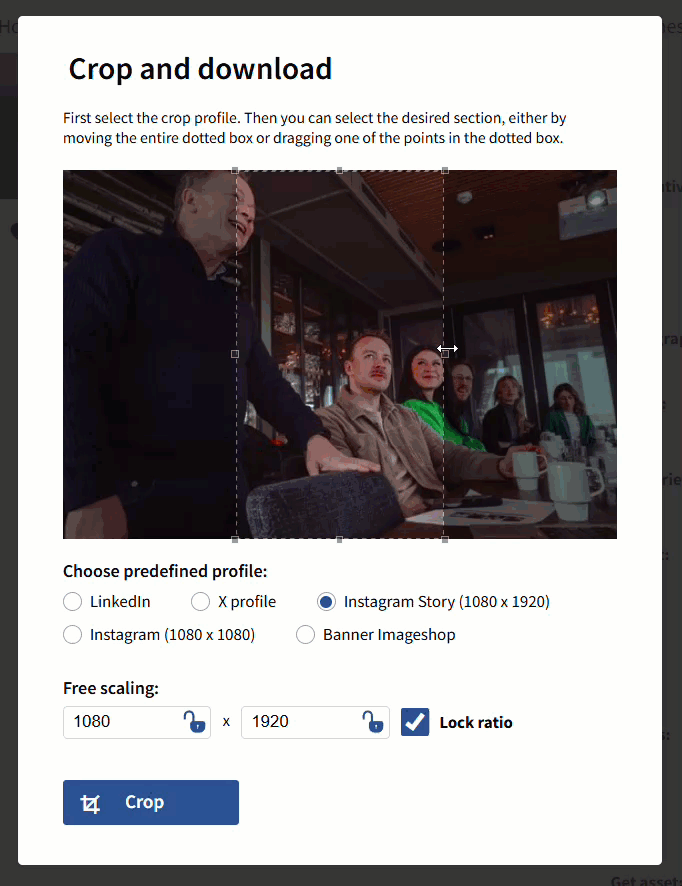
The crop module in Imageshop allows you to download a specific snippet of an image. You can choose from predefined crop profiles (optimized for social media or website formats) or manually enter the desired height and width.
Note: Cropping is an additional module. If your company wishes to receive more information or pricing details for this module, please contact us at support@imageshop.no.
How to crop an image
- Find the image you want to crop in the image bank, and click on it to open the detail view.
- Click the «Crop» button to the right of the image.
- Select one of the predefined cropping profiles from the menu, or enter your preferred pixel sizes manually under the «Free scaling» field.
- Adjust the selection box on the image to place the crop snippet exactly where you want it, and then click «Crop» to finish.
The cropped version will be downloaded to your computer immediately. Important: This process never affects the original version of the image in the image bank, and the generated snippet does not consume any extra storage space in your solution.