In Imageshop, you can create custom fields that new users must fill out during registration. This is useful if you want to collect additional information from users, such as department, project, customer number, or other relevant details during the registration process. You can choose whether the fields should be required or optional, and decide which type of field to use.
How to create a new field
- Log in to the admin panel.
- Click your name in the top right corner and select “Settings”.
- Select “User registration”.
- Click “Create new field +”.

Configure the Field
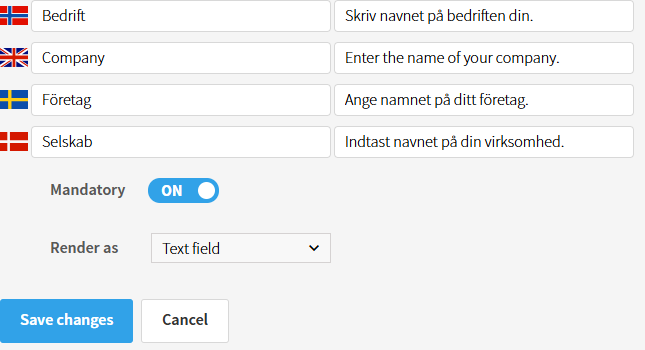
Enter a name for the field. The name on the left is used internally in the administration panel, while the text on the right is displayed to end users during registration.
You can also choose:
- Whether the field should be required or optional.
- Whether the field should be a regular text field (Text field) or a larger text box (Textarea).
How it appears for users
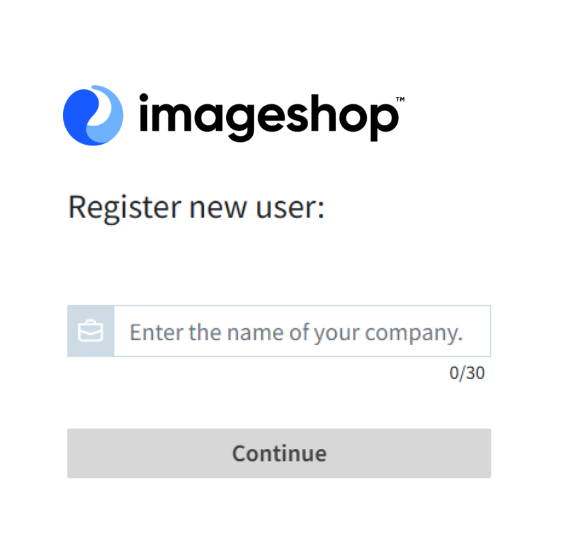
When new users register, the custom fields will appear on step 2 of the registration process.
Tips
- Use required fields if you need specific information from all users.
- Use text boxes (Textarea) if users need to provide longer responses.
- Keep the registration form as simple as possible for a better user experience.